Study in Pictures๐ŸŒ English (United States)
IT Support Technician Illustrated

Digital book in PDF ยท read it on your phone or print it

IT Support Technician Illustrated

Inside the PC, ports and cables, a small office network, subnetting, Windows tools, malware, backups and the seven troubleshooting steps. Each topic gets its own page: the drawing first, then what you need to remember.

  • 67 illustrated pages
  • English
  • 30-day guarantee
US$ 27US$ 63
Get the book ยท US$ 27

Price shown for: United States. In other countries, the checkout shows the price that applies there.

About this book

What it is

Inside the PC, ports and cables, a small office network, subnetting, Windows tools, malware, backups and the seven troubleshooting steps. Each topic gets its own page: the drawing first, then what you need to remember.

Who This Book Is For
  • You're studying at night after work
  • Your exam date is close
  • You already work the help desk
What it covers
  1. Inside the PC
  2. Ports, Cables and Connectors
  3. Networking
  4. Mobile, Printers, Virtualization and Cloud
  5. Operating Systems
  6. Security
  7. Troubleshooting and Procedures
  8. Review Before the Exam
Language
English (United States)
Pages
67
Format
Digital book in PDF ยท read it on your phone or print it
Price
US$ 27 (United States)
Delivery
This is a digital PDF book sent to your email: nothing is printed or shipped.
30-Day Guarantee
30-day guarantee: if a file doesn't open, if the content isn't what the product page describes, if you were charged twice or the email never arrived, write to us and we'll refund you in full.

Look Inside the Book

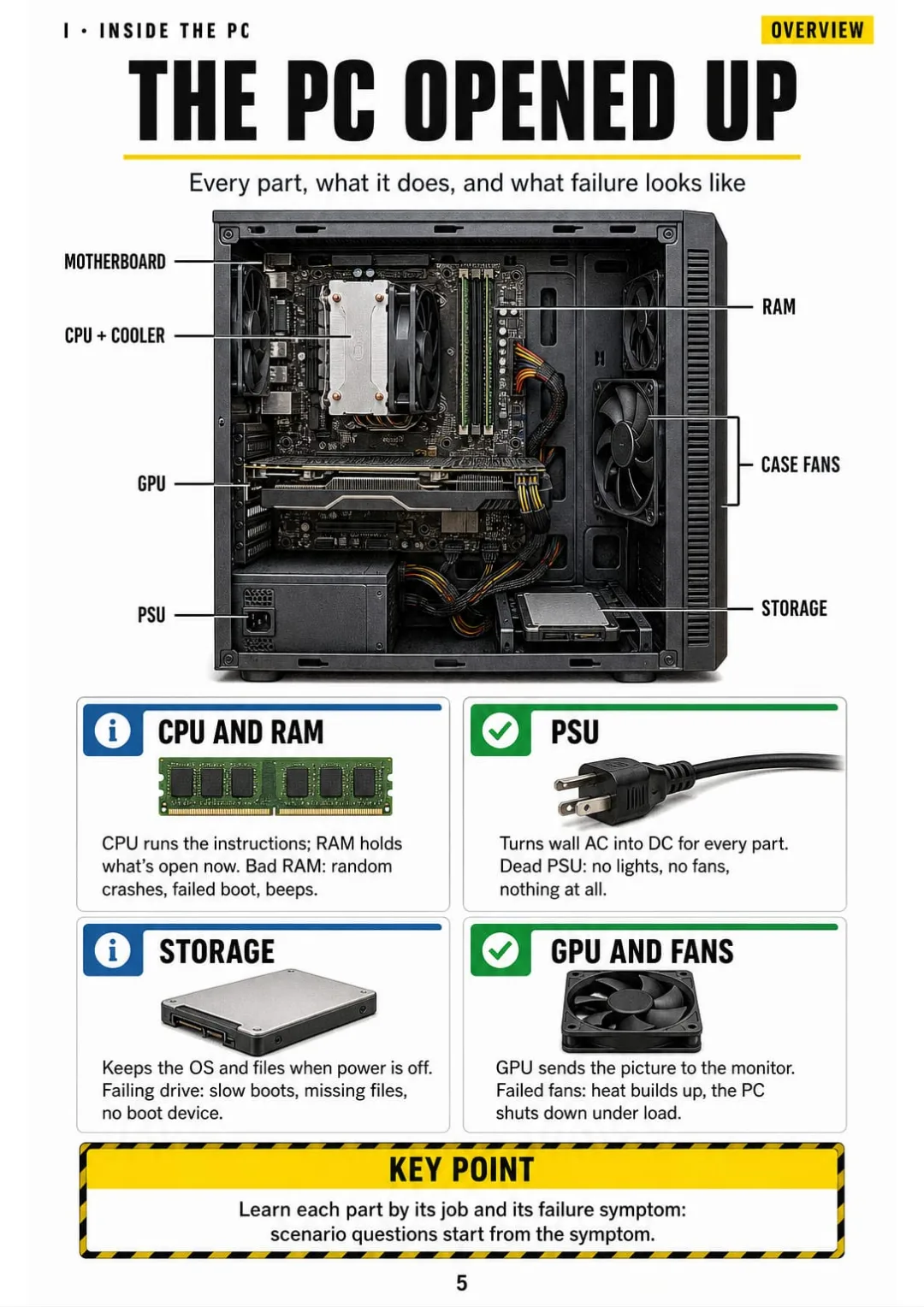
Seven parts labeled in one drawing, each with what it does and how it fails.
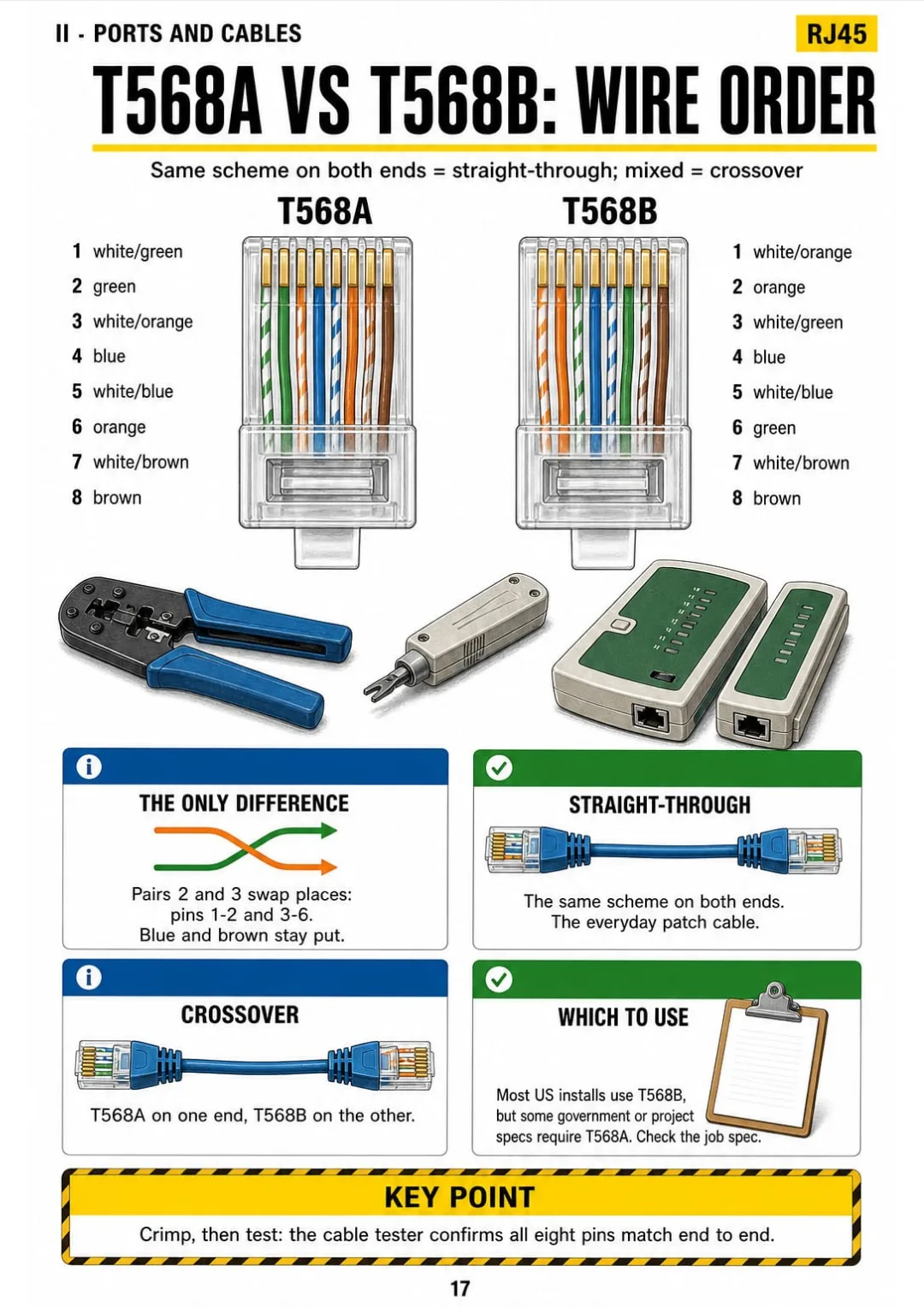
T568A and T568B differ only in pairs 2 and 3 (pins 1-2 and 3-6)
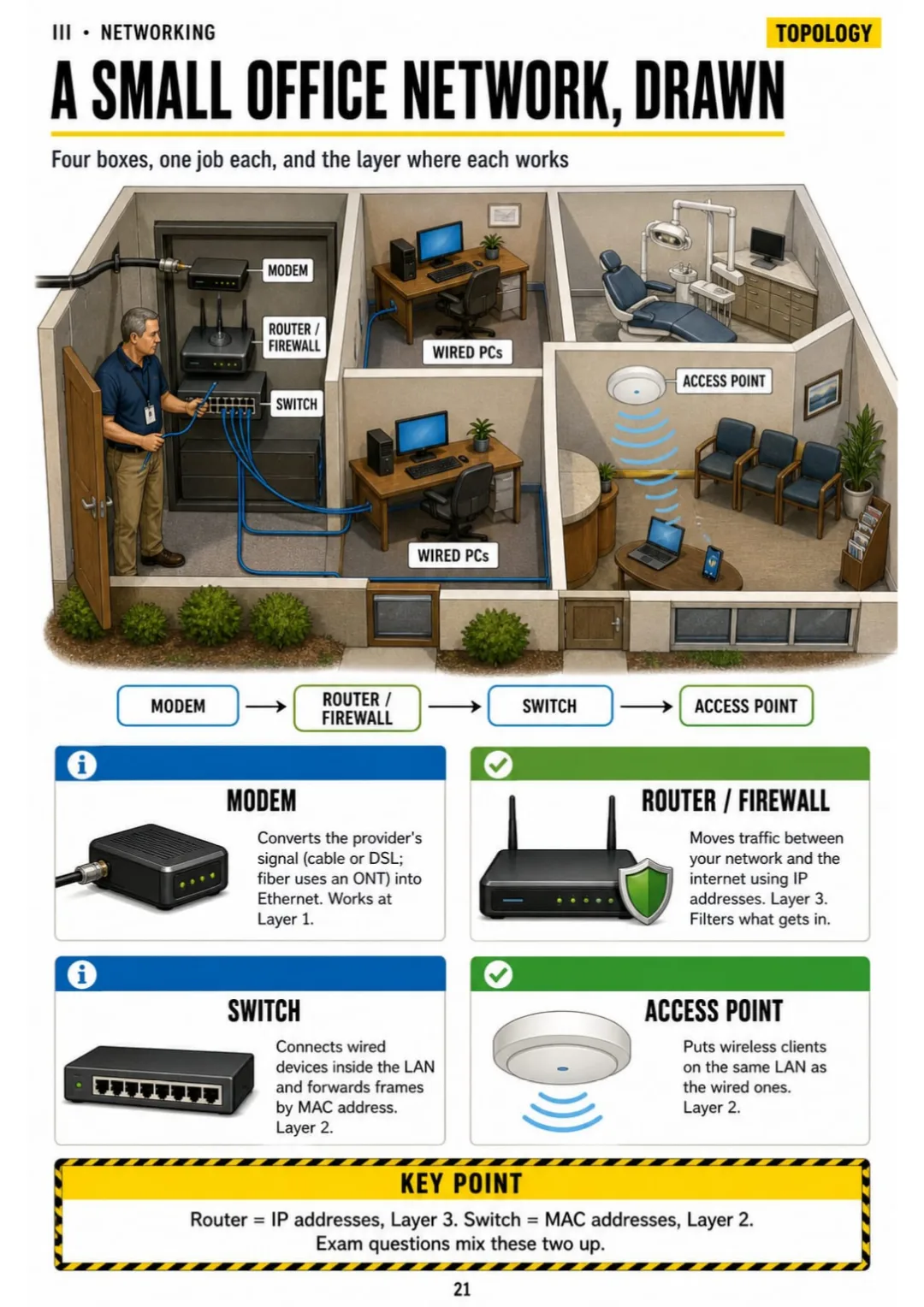
Modem โ†’ router/firewall โ†’ switch โ†’ access point: one job and one layer per box
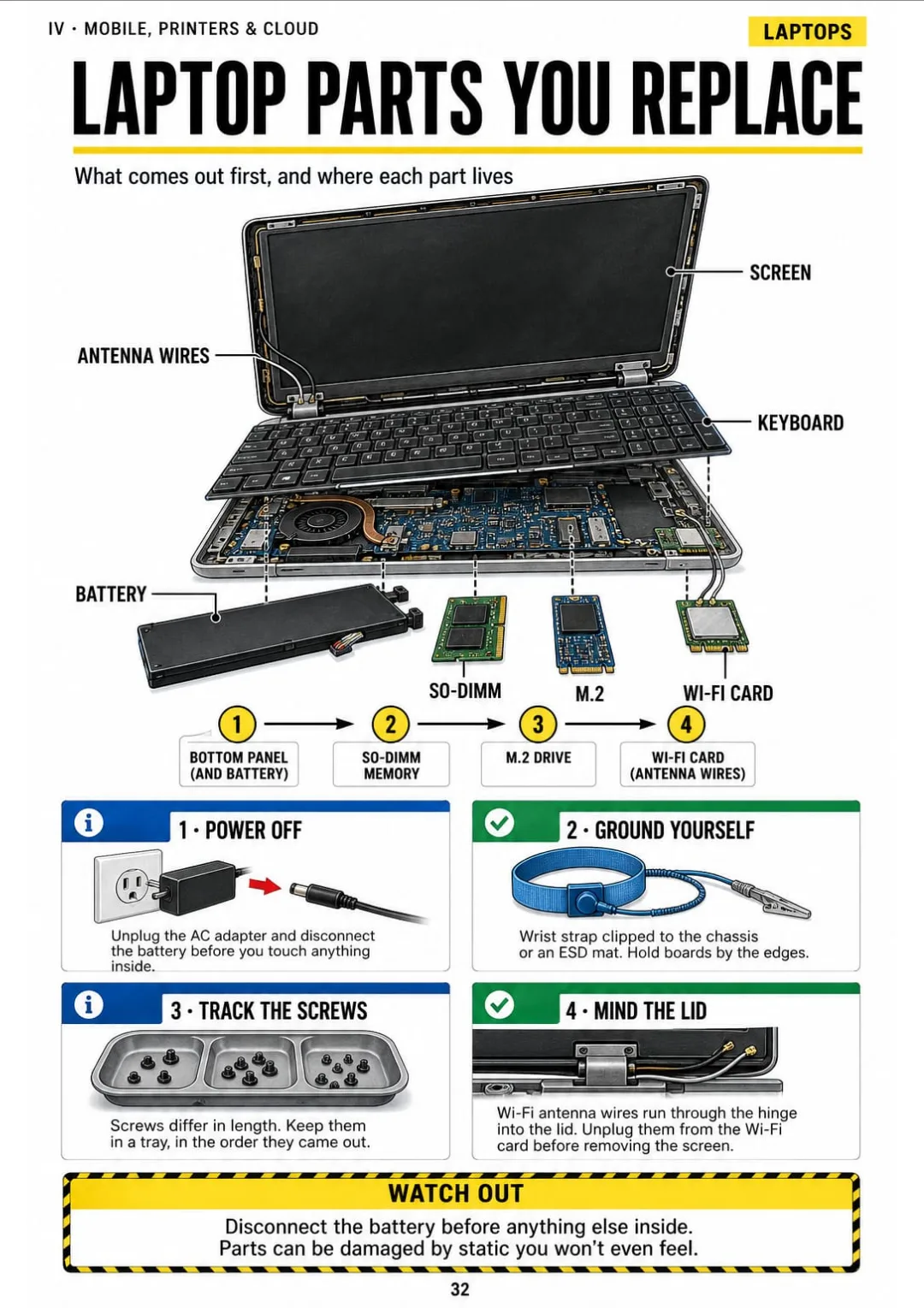
Battery, SO-DIMM, M.2, Wi-Fi card, keyboard, screen and antenna wires, plus four safe steps.
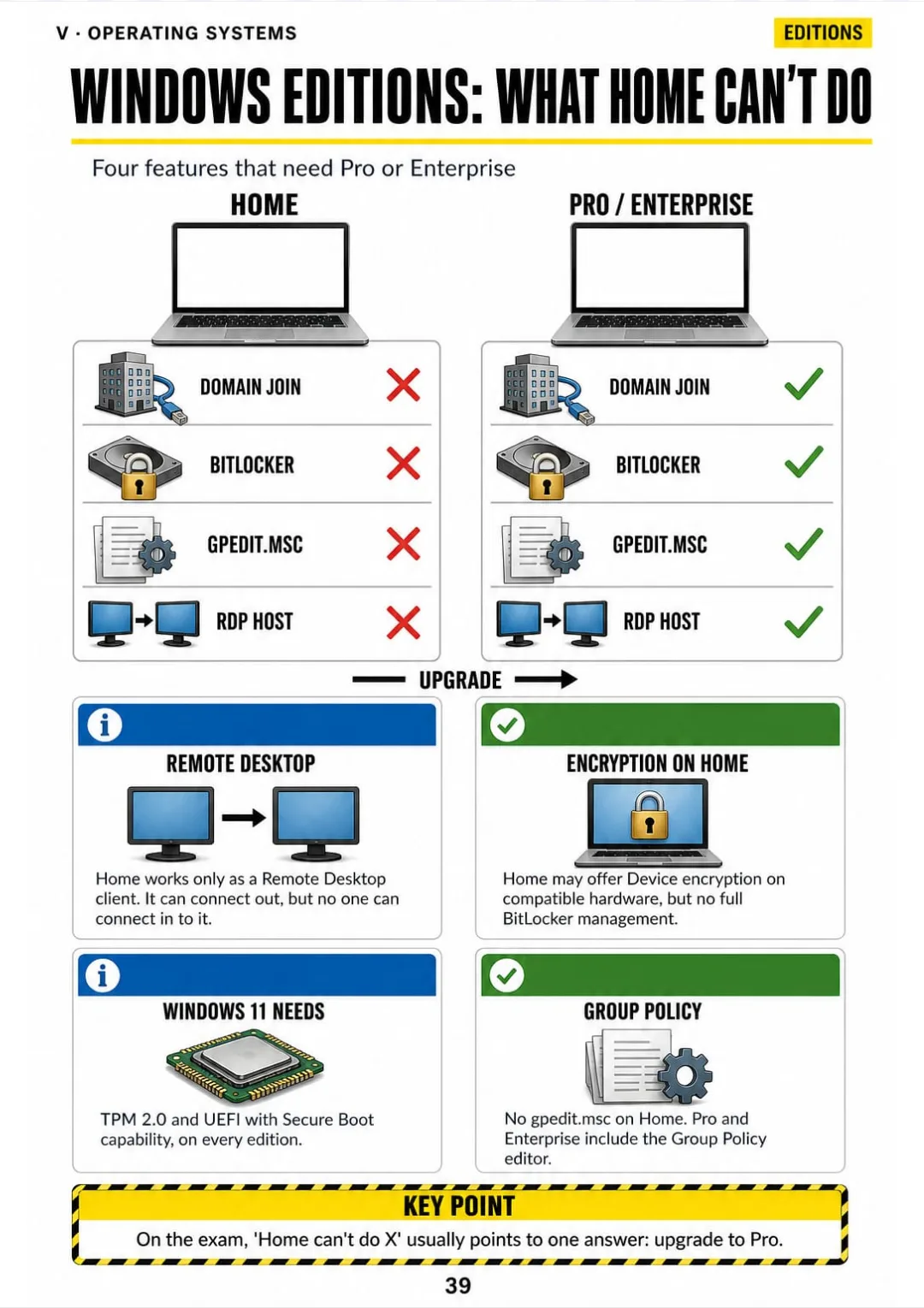
Domain join, BitLocker, gpedit.msc and RDP host: all four need Pro or higher.
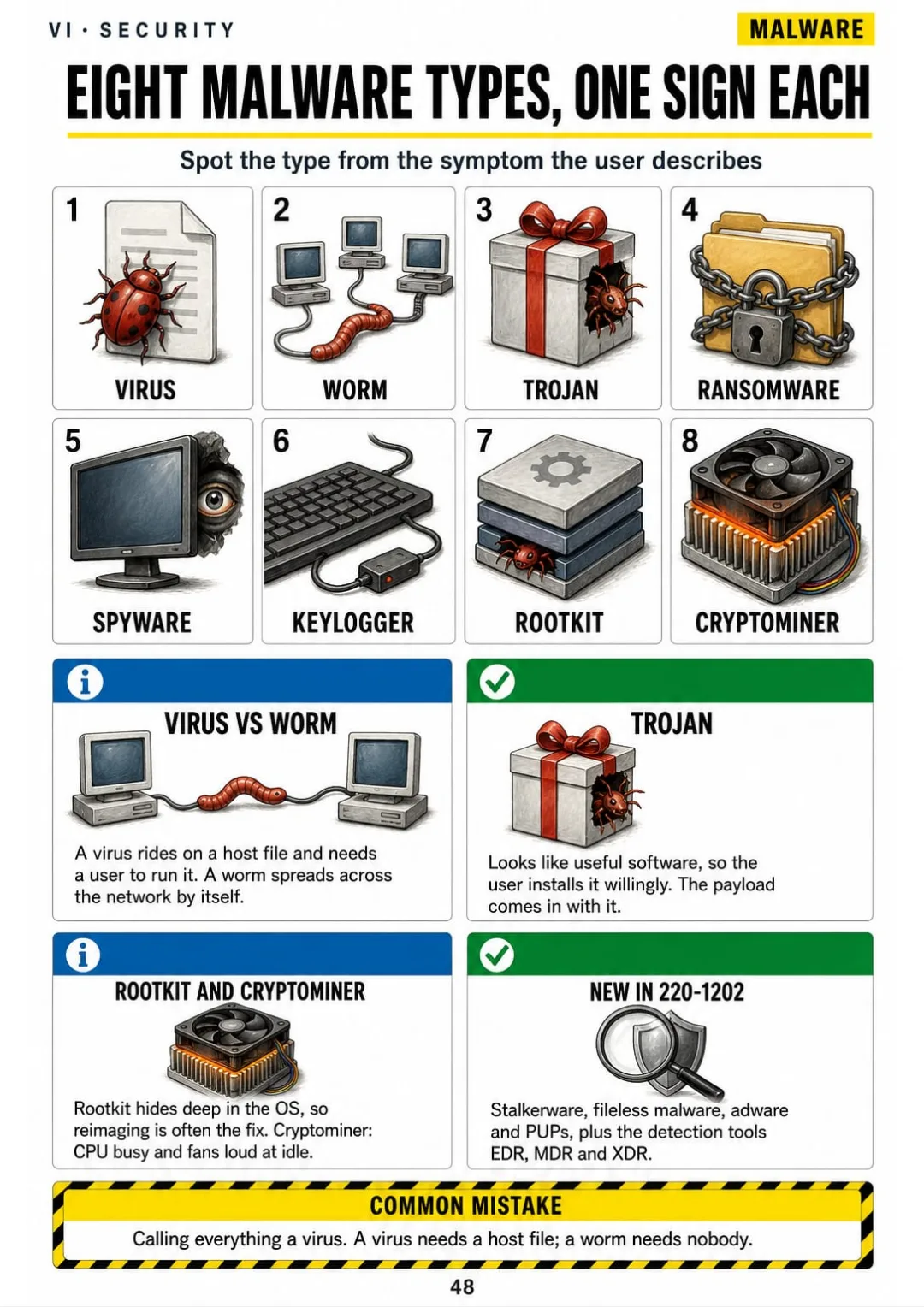
Virus, worm, trojan, ransomware, spyware, keylogger, rootkit and cryptominer: one sign each
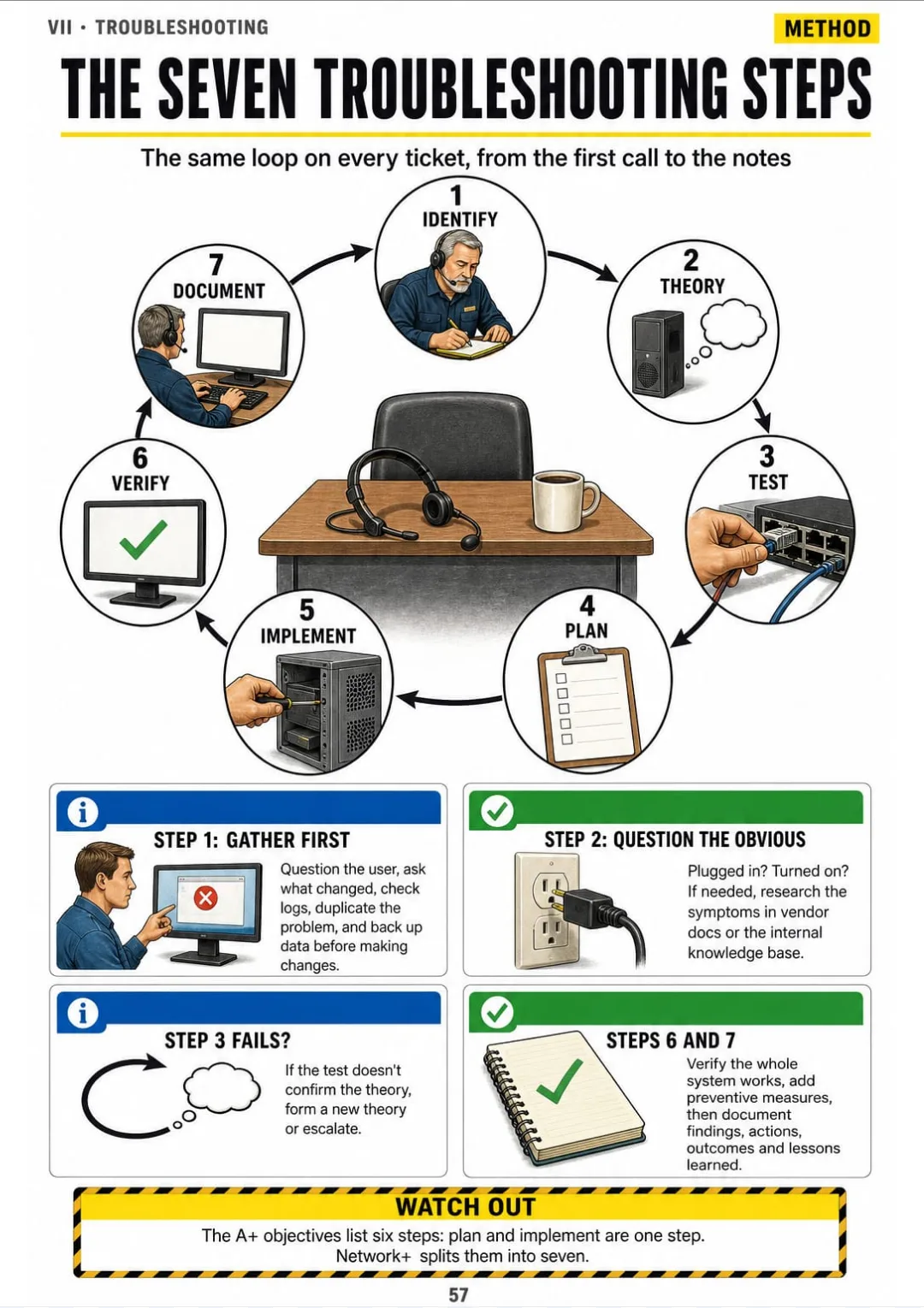
Identify โ†’ theory โ†’ test โ†’ plan โ†’ implement โ†’ verify โ†’ document: the CompTIA troubleshooting method as one loop.
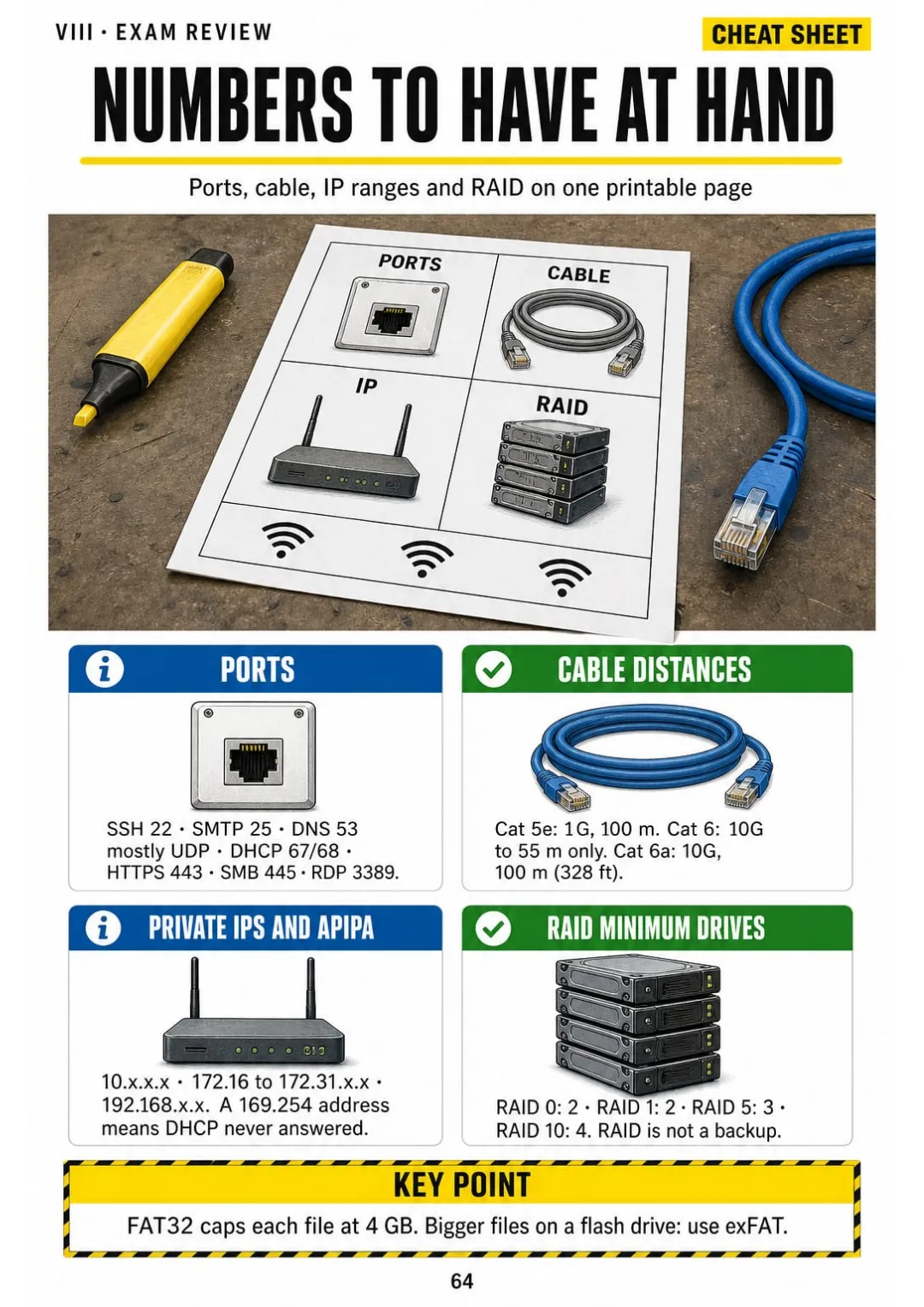
Ports, Cat distances, private ranges, APIPA, RAID minimums and the FAT32 4 GB limit

Take a Look at the 8 Parts and 63 Topics

Inside the PC

pp. 5-13
  1. The PC opened up: every part in its place
  2. Motherboard map: slots, headers and form factors
  3. CPU and cooling: socket, thermal paste, fan
  4. RAM: DIMM vs SO-DIMM, DDR4 vs DDR5
  5. Storage: HDD, SATA SSD, M.2 NVMe
  6. RAID 0, 1, 5 and 10 in one drawing
  7. Power supply: watts, rails and connectors
  8. BIOS/UEFI: boot order, Secure Boot, TPM
  9. Expansion cards and building order

Ports, Cables and Connectors

pp. 14-20
  1. USB connectors and speeds side by side
  2. Video ports: HDMI, DisplayPort, DVI, VGA
  3. Network cable: Cat 5e, Cat 6, Cat 6a
  4. T568A vs T568B: the wire order
  5. Fiber and coax at a glance
  6. Storage and peripheral connectors
  7. Wireless links: Bluetooth, NFC, RFID

Networking

pp. 21-31
  1. A small office network, drawn
  2. Ports you must know in one table
  3. TCP vs UDP
  4. An IPv4 address taken apart
  5. Subnetting: one worked example
  6. APIPA and DHCP: why a PC shows 169.254
  7. IPv6 in one page
  8. DNS records and name resolution
  9. Wi-Fi standards and bands
  10. Network types and internet connections
  11. Network tools: crimper to Wi-Fi analyzer

Mobile, Printers, Virtualization and Cloud

pp. 32-38
  1. Laptop parts you replace
  2. Mobile devices: sync, MDM and accessories
  3. Laser printer: the seven steps
  4. Inkjet, thermal and impact printers
  5. Printer problems by symptom
  6. Virtualization: Type 1 vs Type 2 hypervisor
  7. Cloud models: IaaS, PaaS, SaaS

Operating Systems

pp. 39-47
  1. Windows editions: what Home can't do
  2. File systems: NTFS, FAT32, exFAT, ext4, APFS
  3. Installing Windows: clean, upgrade, image
  4. Windows tools: where each one lives
  5. Command line, part 1: network commands
  6. Command line, part 2: disk and system commands
  7. Users, permissions and shares
  8. macOS for the Windows tech
  9. Linux basics for help desk

Security

pp. 48-56
  1. Malware types told apart
  2. Malware removal: the steps in order
  3. Social engineering on the job
  4. Logins: MFA, passwords and least privilege
  5. Wireless security: WPA2 vs WPA3
  6. Windows security settings
  7. Physical security
  8. Data destruction and disposal
  9. Backups: full, incremental, differential

Troubleshooting and Procedures

pp. 57-63
  1. The seven troubleshooting steps
  2. No power, no POST, no boot
  3. Slow PC and blue screens
  4. 'The internet is down': the checks in order
  5. Safety and the environment
  6. Tickets, change management and documentation
  7. Talking to users: calls and walk-ups

Review Before the Exam

pp. 64-67
  1. Numbers to have at hand
  2. Pairs that get mixed up
  3. Most common mistakes on practice questions
  4. Your study plan for Core 1 and Core 2

Who This Book Is For

You're studying at night after work

One topic per page, so a single evening covers a few pages and they're still clear the next day. No 40-hour video to restart.

Your exam date is close

Ports, private ranges, RAID minimums and the pairs that get mixed up, on review pages you can print and go over the week before.

You already work the help desk

The seven troubleshooting steps and the 'internet is down' checks in order, to keep at your desk and follow the same way on every ticket.

Plus: 2 Free Books

IT Support Exam-Style Practice Questions with Explained Answers
BONUS 1

IT Support Exam-Style Practice Questions with Explained Answers

Test yourself on every part of the exam and see in one line why each answer is right, so you find your weak spots before exam day.
Ports, Commands & Troubleshooting Quick Sheets
BONUS 2

Ports, Commands & Troubleshooting Quick Sheets

Port numbers, key commands and the troubleshooting steps on printable one-page sheets to review in ten minutes and keep at the desk.

30-Day Guarantee

30-day guarantee: if a file doesn't open, if the content isn't what the product page describes, if you were charged twice or the email never arrived, write to us and we'll refund you in full. You pay once. No subscriptions.

Frequently Asked Questions

Is it for me if I'm switching to IT and studying after work?

Yes. It's built for adults studying for an entry-level IT support certification on limited time. It isn't a 'what is a mouse' book: it goes into subnetting with a worked example, RAID levels, T568A vs T568B, permissions and the exam's seven troubleshooting steps. If you already fix computers, it puts names, numbers and the exam's order to what you already do.

Where does the content come from?

It's checked against the current CompTIA A+ exam objectives, Core 1 (220-1201) and Core 2 (220-1202), not the older 220-1101/1102 versions. The book explains those topics with its own drawings and words; it doesn't reproduce the objectives text.

Is this official material?

No. It's independent study material, not affiliated with, endorsed by or approved by CompTIA. It doesn't include an exam voucher or a certificate: you register for and pay for the exam separately, with the exam provider.

Does it replace a course or hands-on practice?

No, and it isn't trying to. Videos and labs show you how to do it. This book is what you open after them: one topic per page, with the ports, numbers and steps drawn and in the same order every time, so you can review in an evening without restarting a 40-hour course. Use it alongside your course, your labs and the official objectives.

Are the practice questions the real exam questions?

No. They're written for this book, in the style of the exam, with a one-line explanation for each answer. They are not official questions from any exam.

When and how do I get it?

The book and the 2 bonus books come as PDFs by email, to the address you enter at checkout.

Do I have to pay every month?

No. It's a one-time payment. No subscription.

Can I have it on paper?

Yes. The PDFs are made to print, at home or at a print shop, so you can keep the pages you need at your desk.

How do refunds work?

You have 30 days. We refund everything if the file won't open, if the book isn't what you see on this page, if you were charged twice or if the email doesn't arrive: just email us.

US$ 27US$ 63
Get the book ยท US$ 27

This is a digital PDF book sent to your email: nothing is printed or shipped.